Netvisor 11 GPS Vehicle Locator
Advanced Tracking Solution by Bonrix Track & Trace System
Netvisor 11 GPS Automatic Vehicle Locator

Device Functions
- Online GPRS monitoring
- Remote management through GPRS channel
- Remote management through SMS channel
- ADC sensors support
- Digital sensors support
Server Configuration
To connect Netvisor 11 to the Bonrix Data Center set the following parameters in configuration software or file:
| Server IP: | 121.246.78.105 |
|---|---|
| Server port: | 8081 |
| Server phone number: | +375293902240 |
Device Identification
For correct identification in the Bonrix Track & Trace System software, configure these settings:
| Unique ID: | Serial number |
|---|---|
| Phone number: | Device's SIM card number in international format (e.g. +14155552671) |
General Settings Configuration
In the General tab of the device settings, configure the following parameters:
-
Name
Enter device name from 4 to 50 characters. This name will appear in all reports and interfaces.
-
Device type
Select device type from the list of supported equipment. Make sure to choose "Netvisor 11" for optimal performance.
-
Unique ID
Enter a unique ID for the device to be identified by the system. For Netvisor 11, this is typically the device serial number.
-
Phone number
Enter the phone number of the device if it has an embedded SIM card. The number must be in international format starting with "+", followed by country code, carrier code, and phone number (e.g. +14155552671).
-
Device access password
Set a password to manage the device remotely. This password is required for all remote configuration changes.
-
Creator
If you manage multiple users, select the creator of this device configuration from the dropdown list.
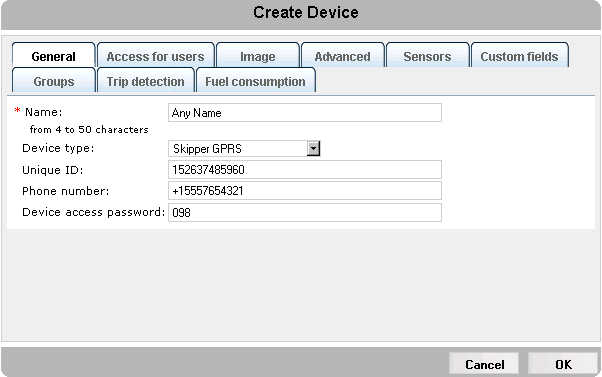
Netvisor 11 Configuration Interface
Rugged Design
Built for harsh environments with industrial-grade components
Low Power Consumption
Optimized for extended operation on vehicle battery
Enhanced Security
Multiple security layers including encrypted communication
Multiple Interfaces
Supports various sensors and CAN bus integration